-
1. USER SURVEY
Before we dove into the project we collected some data from two different interviewees that were both car enthusiasts. Below are some of the questions about autonomous vehicles and their responses.
- Have you ever ridden in an autonomous vehicle? Either as a driver or a passenger?
- Would you be comfortable riding in an autonomous vehicle?
- Why/why not?
- Would you ever consider owning an autonomous vehicle?
- What information would you want access to in regards to the car’s driving decisions to make you comfortable/more comfortable in an autonomous vehicle?
- How would you want to access that information – on dash, in car, auditory, visual, in app, etc.?
And their responses:
- Neither interviewee had ridden in an autonomous vehicle but one had ridden in a Tesla with self-driving features.
- Neither interviewee was comfortable riding in an autonomous vehicle.
- The interviewee that had ridden in a Tesla had a bad experience and the other doesn’t trust the computer to make the right judgement calls.
- Neither interviewee would consider owning an autonomous vehicle at this point.
- Both interviewees would want to know as much as possible about the vehicles designs including its decisions, information on the vehicle’s status, and an explanation of the decisions.
- One interviewee preferred the traditional dashboard while the other preferred an app or website portal.
-
2. COMPETITIVE ANALYSIS
As of the end of 2021, there are no fully autonomous vehicles at this time. The closest thing is Tesla’s vehicles with self driving assistance. At this point all vehicles require human input and can accept human overrides of the vehicle’s decisions. Fully autonomous vehicles would have no human input at all.
-
3. PERSONAS
From the survey information we decided to focus on the early adopters of this product since fully autonomous cars are not available in the market as of yet. We did focus down on a subset of users that would have trouble using a traditional vehicle due to health conditions as this would give them a way to travel without driving themselves.
Phil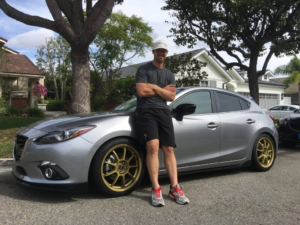
- Name: Phil
- Age: 52
- Occupation: Bank manager
Bio: Phil is a bank manager who loves cars and traveling. Phil’s biggest hobbies involve some sort of traveling whether it is going to a car show, going to the movies, or going to a nearby park to do some hiking.
Attitude: independent, hard working
Behavior: family oriented, travel enthusiast, worried about losing independence
-
4. PROTOTYPING
Our initial prototype consisted of a series of photos mapping out the general concept of the interface. This layout served as the foundation for our final, interactable prototype.
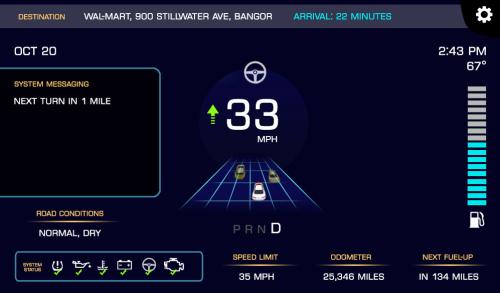
Figure 1: General layout as may be seen while the vehicle is in operation.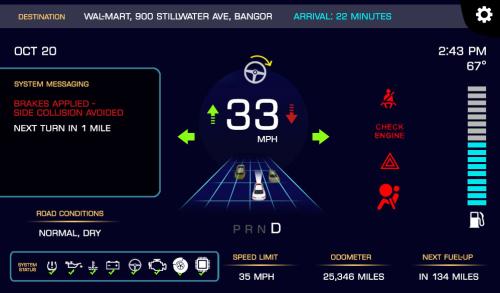
Figure 2: All icons within the interface are displayed.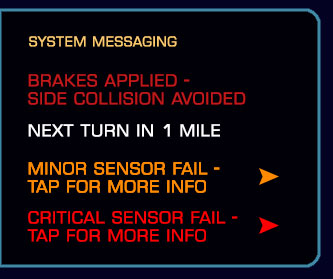
Figure 3: Example messages the system may communicate to the rider(s).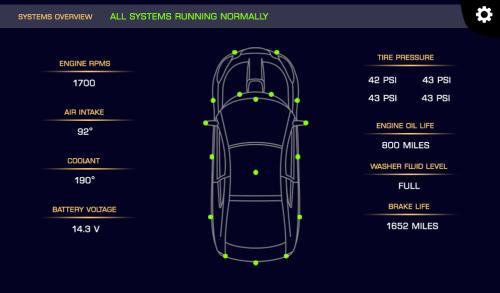
Figure 4: System status screen. Displays the status of various sensors and under-the-hood components.Our final prototype, created with Azure, kept this layout and added interactivity. The user can set their destination and toggle between the main screen and the system status screen. The dashboard indicators can be selected and the meaning of the icon will be shown. A walkthrough of the mockup can be seen in the Storyboards section below.
-
5. STORYBOARDS
Phil decides to spend his day off hiking at Acadia National Park. He starts his autonomous vehicle, the dashboard displays, and he enters his destination:
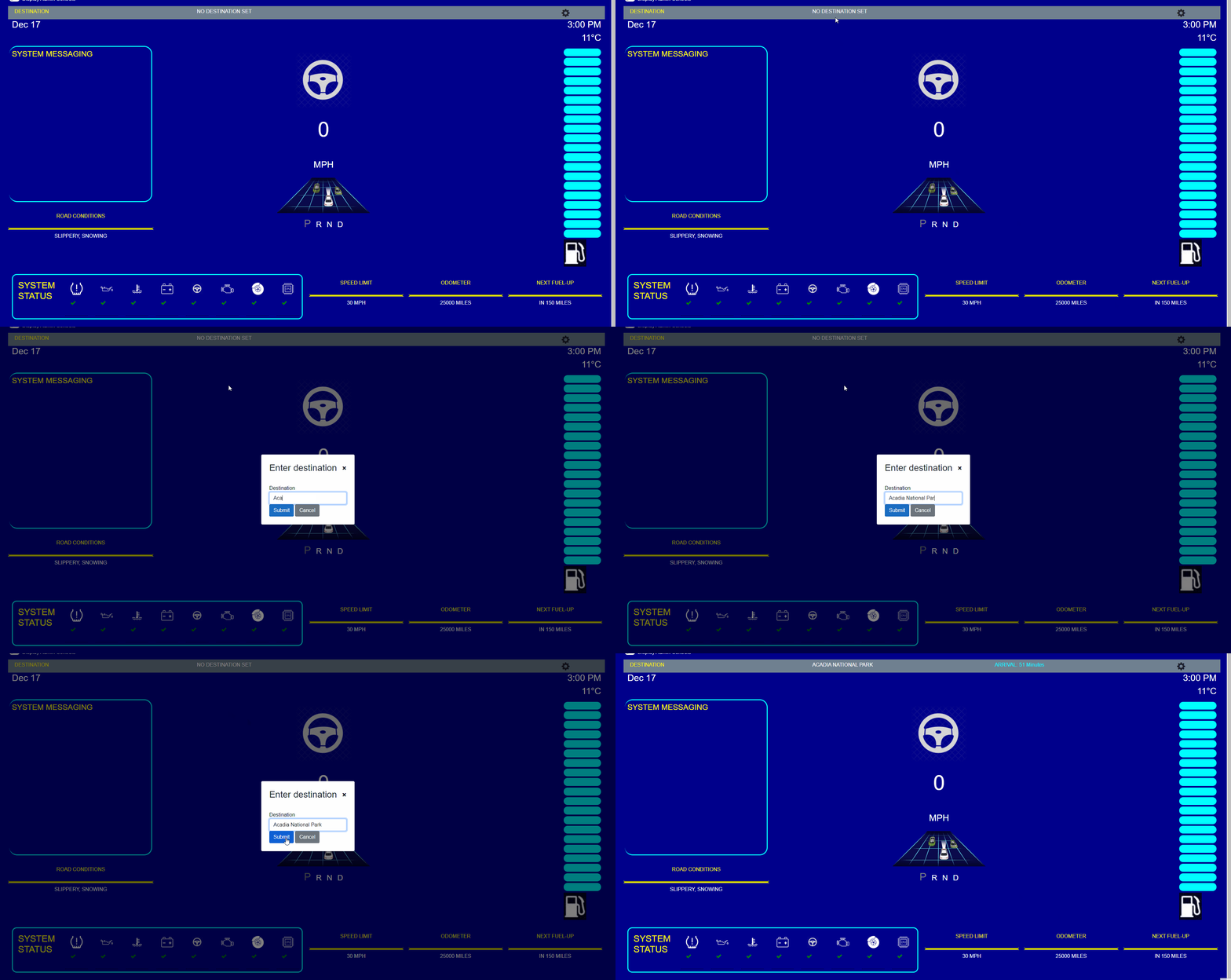
Once he is on the highway, he wants to make sure that his vehicle is functioning properly. He checks the main dash indicators in the bottom left corner of the interface, and then navigates to the System Status screen to check the status of other components:
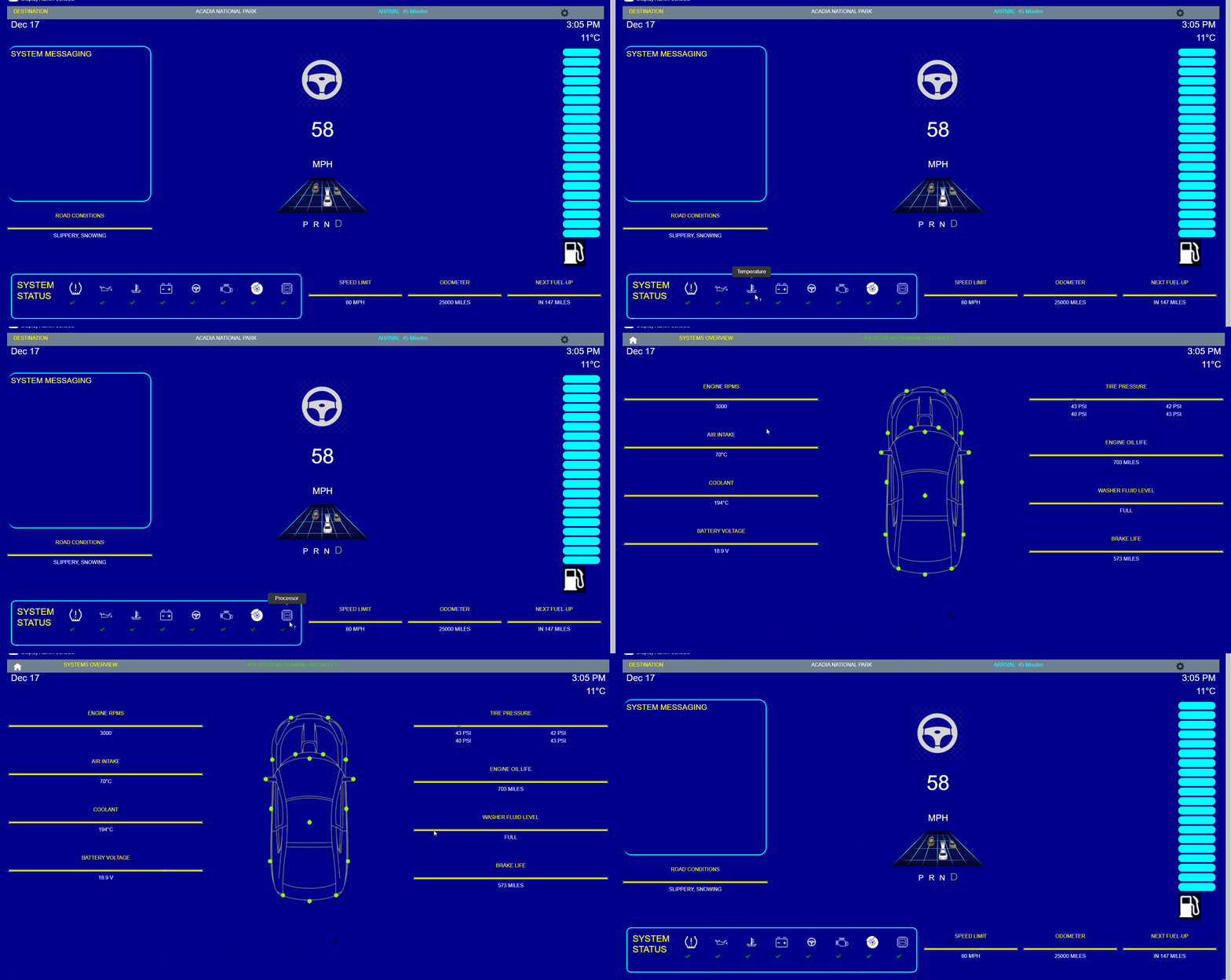
Everything seems to be in order! Phil is reassured that the vehicle is in a safe condition to operate.
A few minutes later, the driver of a non-autonomous vehicle fails to check his blind spot, which Phil’s vehicle is in, and attempts to merge into Phil’s lane. The sensors of the autonomous vehicle detect that a side collision will occur if it does not slow down and allow the other driver to merge in front of it. The brakes are rapidly applied and, fortunately, enough distance is created from the other vehicle to avoid an accident:
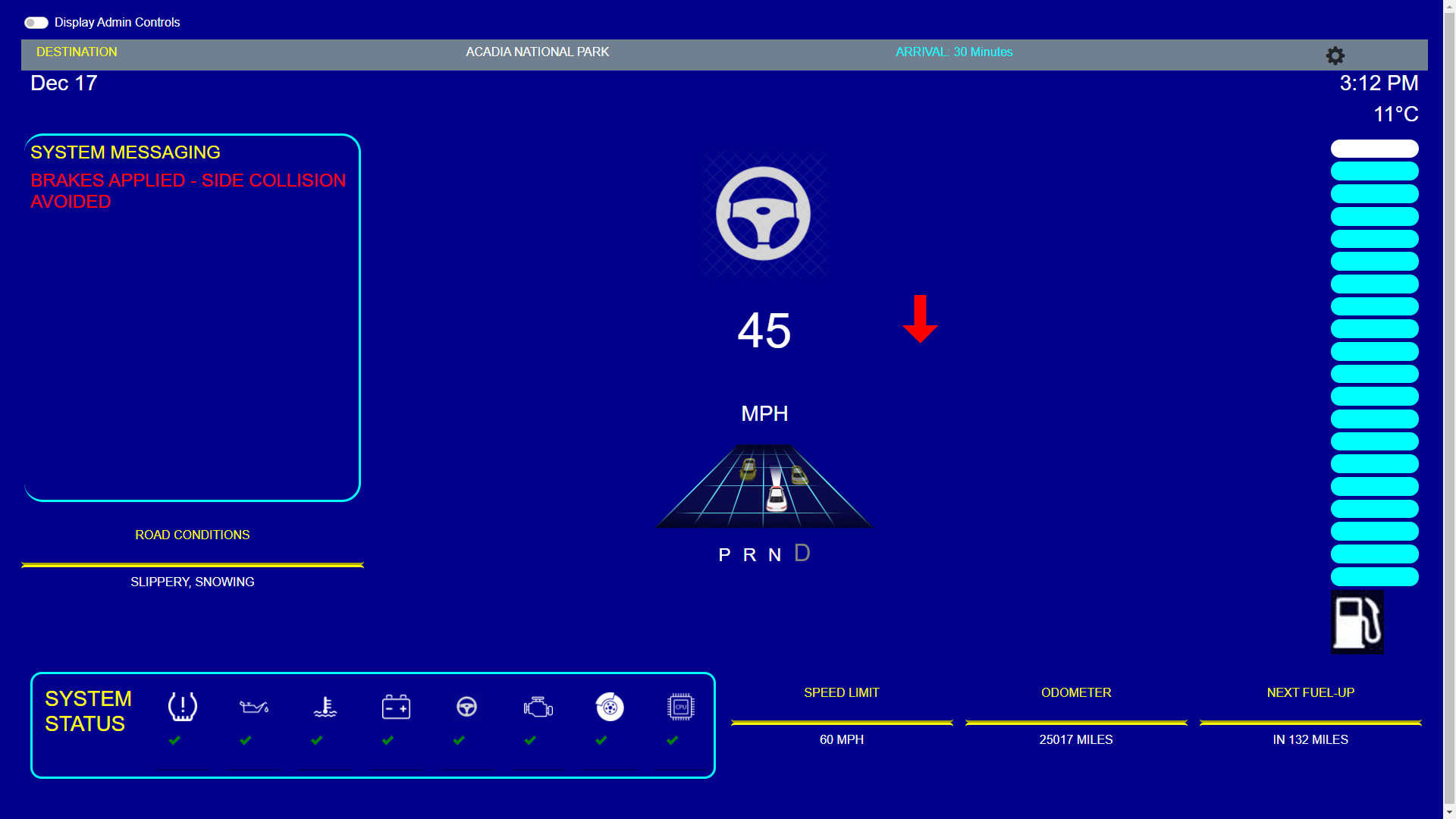
To Phil’s relief, no other close calls occur during his transit. The vehicle safely arrives to the parking lot of Acadia and alerts Phil that he is now at his destination:
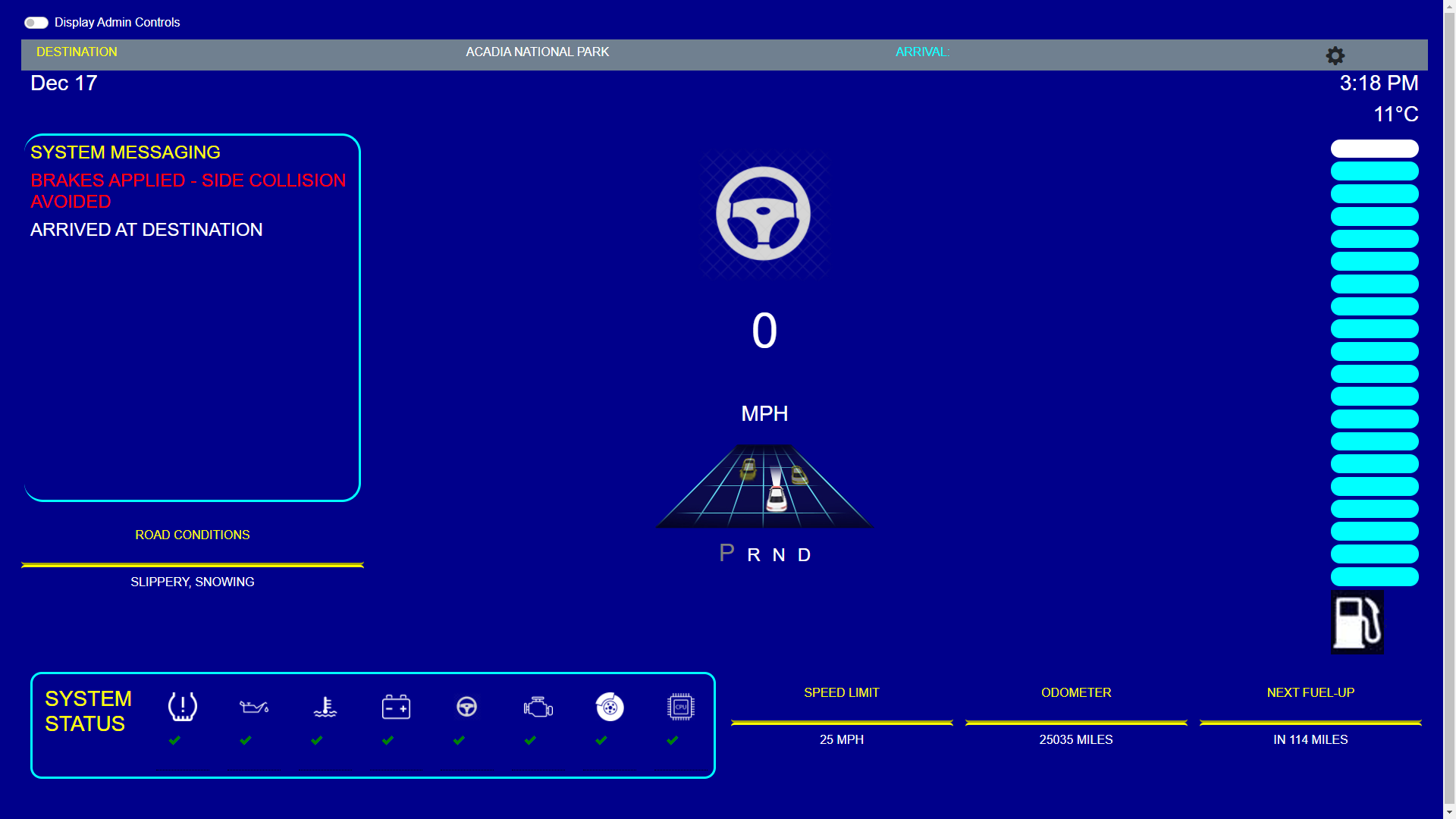
-
6. IMPLEMENTATIONS
We could not make a fully implemented solution as we don’t have a vehicle that has all the sensors. We implemented a mockup of what the dashboard would be with options for the user to control the display. The finished product would be controlled by sensors instead of a user.
The mock up website is built using a randomizer that will update the UI.
The mock up does have an option to be installed as an app to support offline use as the autonomous car may not always be connected to the internet.
System messages are read to the user when added by the sensors or in this case the randomizer.
Help text are added for logos so that anyone can know what it means easily.
There is a spot for the user to input the destination so the car knows where to go. This would be the only input the user would use in the finished product.